Breaking Changes in 1.2.0
If you are upgrading from any luna_quantum version before 1.2.0 please refer to the
Release Notes containing the migration guide.
You do not need to update right away, older versions of luna-quantum (< 1.2.0) will still work as before.
However, you should upgrade to the latest version as soon as possible, since future updates of the Luna platform might break compatibility. If this will be the case you will be noticed by us with enough lead time for you to migrate to the newer version.
LunaSolve
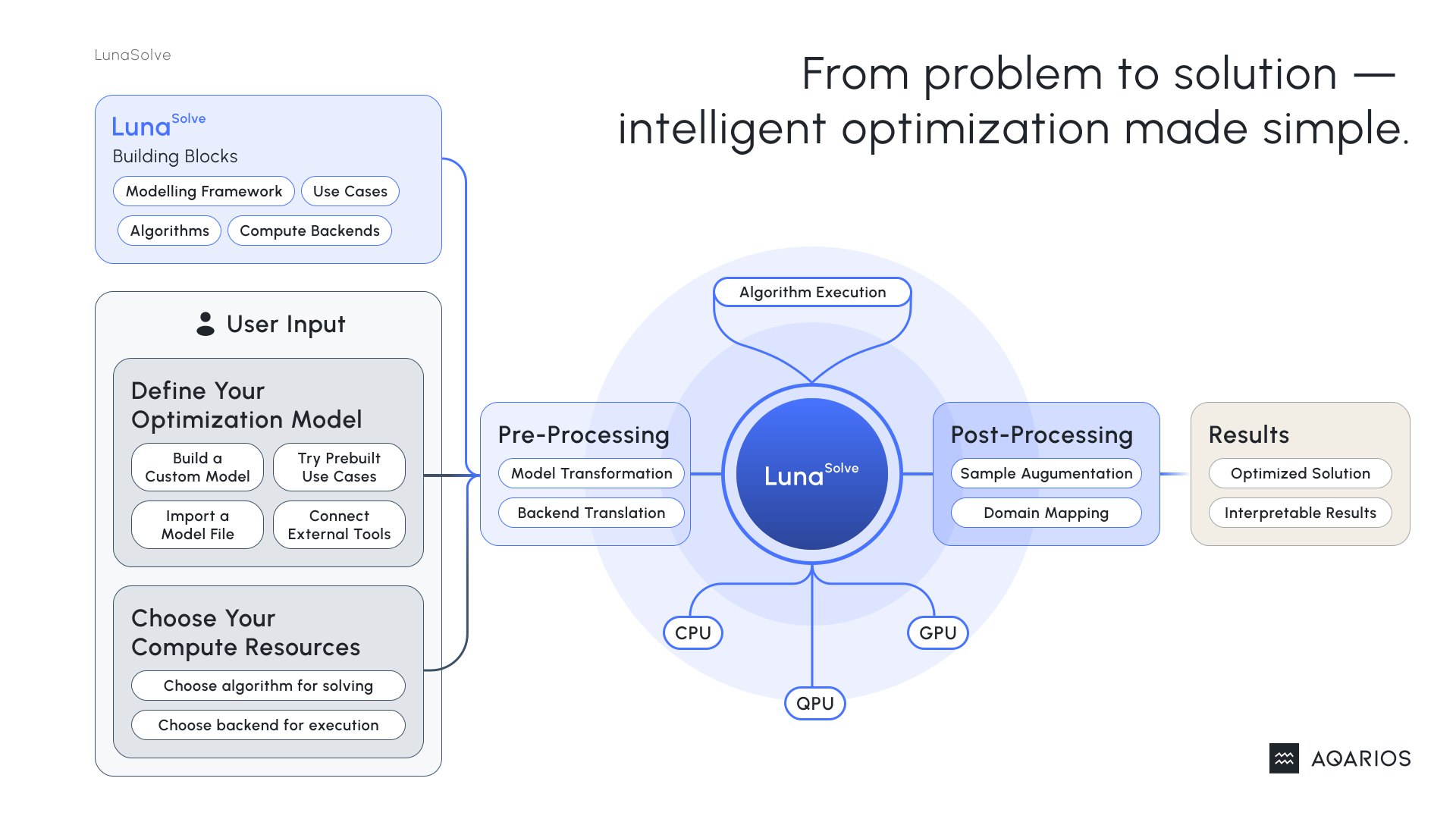
LunaSolve lets you solve complex optimization problems, offering out-of-the-box solution strategies with high control over configurability. From transforming complex problems into actionable results to fine-tuning algorithms, LunaSolve adapts to your level of customizability.
LunaSolve is part of the luna-quantum SDK and can be installed with:
Solve Your Problem in Four Simple Steps
- Define Your Model – Specify the problem structure and parameters.
- Select an Algorithm – Choose an appropriate solver for your optimization task.
- Execute the Solve Step – Run the solver with a single command.
- Inspect the Results – Analyze the solution output, including decision variables and objective values.
Quickstart
In the example below, we’ll demonstrate these steps using a simple Model.
Create Your Model
To define your optimization problem for LunaSolve, you need to create a Model.
Loading an existing optimization problem
Use any of the builtin translators available in LunaModel to load your optimization problems from other industry-standard formats.
from luna_quantum import Model, Vtype

model = Model("YourModel")
x = model.add_variable("x")
y = model.add_variable("y")

model.objective = 3 * x + 4 * y + 12 * x * y
Want to learn more about building models programmatically?
Check out LunaModel, our modeling framework powering LunaSolve, for all modeling features and capabilities, including more advanced modeling techniques.
Effortless Modeling with the Use Case Library
Explore our curated collection of use cases designed to simplify modeling of common optimization problems. Visit our Tutorials to learn how to get started.
Instantiate an Algorithm
You need to instantiate an algorithm to solve the optimization problem. In this example, we use the SimulatedAnnealing algorithm with default configuration.
Available Algorithms and Backends
For more information on configuration of algorithms and backends, please refer to the Algorithms and Backends documentation.
Run the Algorithm
To run the algorithm, you need to call the .run(model, ...) method on the algorithm instance. You can also provide a name for the solve job to help you identify it later.
Model Upload
If your model hasn't been uploaded yet, running a solver will automatically upload it to the Luna platform. This ensures it's securely stored and available for future use. You can also upload models manually. See the Models documentation for details on automatic and manual uploads.
Retrieving Job information
Please refer to SolveJob Documentation for further information on how to inspect your submitted solve job.
Analyze the Result
To wait for and retrieve the result of our optimization, we call the .result() method on the solve_job. This method returns a Solution providing a variety of methods to evaluate our result with.
solution = solve_job.result()

best_result = solution.best()[0] # We select just the first best result of the solution here.
best_value = best_result.obj_value

print(f"Best result: {best_result}")
print(f"Objective value of one best result: {best_value}")
Best Results of a Solution
Calling .best() on a solution can also return None, since a result is only considered to be a best result if it is feasible. We did not define any constraints on our Model, so all results are feasible.
Analyzing the Solution
Please refer to Solution Documentation for details on all methods available for analyzing results of optimization problems.
Congratulations! You have successfully created and solved an optimization problem using LunaSolve and LunaModel. You can now use the result to make informed decisions and optimize your business processes.