Solving the Max Independent Set Problem
In this notebook, we will describe how to solve the Max Independent Set with LunaSolve. We will begin by defining, explaining and giving an example for the Max Independent Set problem. We will then continue by modeling a problem instance, optimize it and implement the solution using LunaSolve. Finally, we will also take a further look at the interpretation of the answer we are returned from Luna.
Table of Contents
1. Max Independent Set
The Max Independent Set problem is a fundamental challenge in graph theory. It asks us to find the largest possible group of nodes in a graph such that no two nodes in the group are connected by an edge, in other words, a subset of nodes that are completely disconnected from each other.
Formally, let \(G = (V, E)\) be an undirected graph. An independent set is a subset of vertices \(S \subseteq V\) such that for every pair of distinct vertices \(u, v \in S\), the edge \((u, v) \notin E\). The Max Independent Set problem then asks us to find the largest such subset \(S\).
2. A Real-World Example
To bring this idea into a practical context, imagine managing a library with several study rooms. Some rooms are located close enough that noise from one room can disturb another. The goal is to select the largest number of rooms that can be used at the same time without any potential for noise interference.
Consider six study rooms labeled A, B, C, D, E, and F. The following constraints define which rooms interfere with one another:
- A and B cannot be used at the same time.
- A and C cannot be used at the same time.
- B and D cannot be used at the same time.
- C and D cannot be used at the same time.
- D and E cannot be used at the same time.
- E and F cannot be used at the same time.
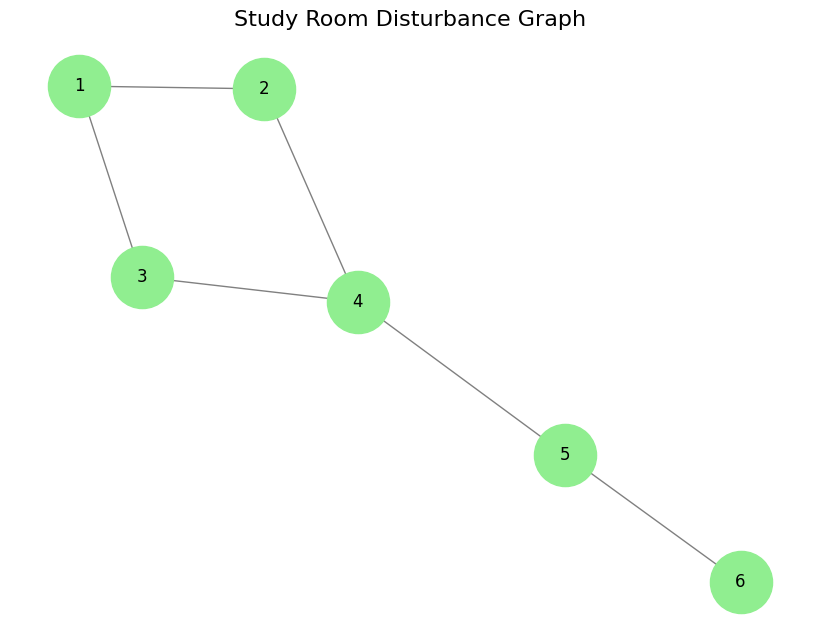
We can represent this scenario with a graph where each room is a node, and an edge connects any pair of rooms that interfere with each other. Solving the Max Independent Set problem on this graph will give us the largest group of study rooms that can be used simultaneously without causing disturbances.
3. Solving the Max Independent Set problem with Luna
To follow along with the next steps, you'll need the following libraries: 1. luna_usecases for modeling our optimization problem, 2. luna_quantum for solving it, 3. matplotlib for visualizing the results, and 4. networkx for creating and displaying the graphs.
Run the cell below to install these libraries automatically if they aren't already installed.
%%capture
# Install the python packages that are needed for the notebook
%pip install --upgrade pip
%pip install luna_quantum luna_usecases --upgrade
%pip install matplotlib networkx
3.1 Setting Up the Luna Client
Now let's dive into solving the Max Independant Set problem using LunaSolve. First, you'll instantiate a LunaSolve object and configure your credentials. The API key identifies your account and grants access to Luna's services. You can find your API key in your Aqarios account settings.
import os
import getpass

os.environ["LUNA_LOG_DEFAULT_LEVEL"] = "WARNING"
os.environ["LUNA_LOG_DISABLE_SPINNER"] = "true"

if "LUNA_API_KEY" not in os.environ:
    # Prompt securely for the key if not already set
    os.environ["LUNA_API_KEY"] = getpass.getpass("Enter your Luna API key: ")
from luna_quantum import LunaSolve

LunaSolve.authenticate(os.environ["LUNA_API_KEY"])
ls = LunaSolve()
If you haven't yet configured a QPU token for your account, or if you'd like to add a new one, you can do so using the ls.qpu_token.create() method. However, in this tutorial we will be using a classical solver from Dwave, which does not require one.
3.2 Create a Max Independent Set problem
Any graph with vertices and edges is enough to define a Max Independent Set problem. In this notebook, we'll represent the relationships between the study rooms through a graph. The study rooms are represented as the nodes of the graph. Any time two rooms are close enough to disturb each other, we'll draw an edge between them.
After defining the graph, we will visualize it for better comprehension.
import matplotlib.pyplot as plt
import networkx as nx

# Create the graph
max_independent_set_graph = nx.Graph()

# Add nodes to the graph (which represent the different study rooms)
rooms = [1, 2, 3, 4, 5, 6]
max_independent_set_graph.add_nodes_from(rooms)

# Add edges to the graph (which represent the realtive noice disturbance between the rooms)
disturbances = [(1, 2), (1, 3), (2, 4), (3, 4), (4, 5), (5, 6)]
max_independent_set_graph.add_edges_from(disturbances)

# Draw the graph using maplotlib
plt.figure(figsize=(8, 6))
pos = nx.spring_layout(max_independent_set_graph)
nx.draw(
    max_independent_set_graph,
    pos,
    with_labels=True,
    node_size=2000,
    font_size=12,
    node_color="lightgreen",
    font_color="black",
    edge_color="gray",
)
plt.title("Study Room Disturbance Graph", fontsize=16)
plt.show()
3.3 Defining the Max Independent Set Data
The luna_usecases library ships the Max Independent Set problem as a ready-made use case. Every use case in the library
follows the same five-part contract — Data, Formulation, Instance, Solution and Collection —
so once you have worked through one use case, all the others work the same way.
We start with the Data class, which holds the problem instance itself.
MaxIndependentSetData describes the disturbance graph as a binary adjacency matrix plus the
matching node names. NetworkX's nx.to_numpy_array() produces exactly that matrix; passing
nodelist=rooms keeps its row and column order aligned with our room numbers.
# Import the Max Independent Set data class from the luna_usecases library
from luna_usecases.max_independent_set import MaxIndependentSetData

# Turn the NetworkX graph into an adjacency matrix
adjacency_matrix = nx.to_numpy_array(max_independent_set_graph, nodelist=rooms)

# Describe the problem instance
data = MaxIndependentSetData.from_adjacency_matrix(
    adjacency_matrix=adjacency_matrix, node_names=rooms
)
print(data.to_string())
3.4 Building the Optimization Model
Next we choose a Formulation. The formulation is the recipe that turns the data into decision
variables, an objective function and constraints. Printing it is a quick way to check what the
resulting model will look like before it is built.
Data and formulation are then combined into an Instance, and instance.formulate() returns the
optimization Model — the very same model object you would otherwise have to write by hand, ready
to be handed to any Luna algorithm.
from luna_usecases.max_independent_set import (
    MaxIndependentSetFormulation,
    MaxIndependentSetInstance,
)

# Choose the formulation and inspect how the problem will be modeled
formulation = MaxIndependentSetFormulation()
print(formulation.to_string(data))

# Combine data and formulation, then build the optimization model
instance = MaxIndependentSetInstance(data=data, formulation=formulation)
model = instance.formulate()
3.5 Choose an Algorithm and Run It
The final step is to create a job request, sending our optimization task to the hardware provider to solve. To successfully create a job, we must first select an algorithm for the optimization from LunaSolve's collection, specify the algorithm's parameters and select a backend for the algorithm to run on.
In this instance, we solve the Max Independant Set problem using simulated annealing (sa) and choose D-Wave (dwave) as the hardware provider. Simulated annealing has multiple parameters which can be adjusted to fine-tune the exact optimization. Here we are going to set the num_reads equal to 1000. This means that the annealing process is done 1000 times, returning 1000 sampled results.
Lastly, we execute the job by calling the algorithm.run() method and passing the model together with a chosen name for the job for easy identification.
from luna_quantum.algorithms import SimulatedAnnealing
from luna_quantum.backends import DWave

# Select the SimulatedAnnealingSolver algorithm.
algorithm = SimulatedAnnealing(
    backend=DWave(),
    num_reads=1000,
)

# Execute an outbound solve request.
job = algorithm.run(model, name="MIS with SA")
3.6 Retrieving the Solution
In step 3.4, we built the optimization model, and in step 3.5, we sent it to Luna to be solved. Luna automatically manages the subsequent background processes. This includes preparing the optimization problem, converting it into the correct format for the quantum hardware provider, submitting the problem to the quantum computer, and finally retrieving and translating the solution back into a user-friendly format.
Now let's discuss the final stages: retrieving the solution, converting it back to our original problem representation, and interpreting the results.
First, we'll use the job.result() method to fetch our results. The returned Solution object contains several attributes related to the optimization, including metadata such as the runtime, the count (how often each sample occurred), the objective_value and raw_energies of each sample. To learn more about the Solution Object visit Luna's thorough documentation.
3.7 Interpreting the Solution
The Solution object above reports the samples in the raw decision variables of the model. Turning a
column of \(x_i\) values back into a set of study rooms is possible, but tedious.
This is where the Instance pays off a second time: instance.interpret() decodes a raw Solution
back into the language of the use case. For the Max Independent Set problem, this returns a
MaxIndependentSetSolution holding the independent_set — the rooms that can be occupied at the
same time — together with the set_size and an is_valid flag.
# Decode the raw solution back into the language of the use case
mis_solution = instance.interpret(solution)
print(mis_solution.to_string())
Every use case solution can also draw itself. Passing the original problem data lets the solution highlight the result on top of the problem it belongs to.
Next Steps
- Browse the full catalogue of ready-made problems in the use case library.
- Generate whole benchmark sets of random instances with
MaxIndependentSetCollection.from_random(). - Swap
SimulatedAnnealingfor any other Luna algorithm — the model and the interpretation stay exactly the same.